Original Post

Toribash 3.84 Beta 4
3.84 - Beta 4
http://www.toribash.com/tb_b4.exe - Windows
http://www.toribash.com/tb_b4.dmg - OSX
* Physics caching
Ghost and replays in multiplayer are played back from a buffer instead of calculated using physics. This is much faster.
* Chat cache /opt chatcache 0|1|2 (0=off, 1=ATI, 2=Software)
This makes a big chat faster in multiplayer.
* Camera options
1 - Default Cam
2 - Free Cam (press shift+2 to enable Free Orbit Cam, press shift+2 again to toggle targeting sphere)
3 - Uke Cam
4 - Tori Cam
* Camera keyframes are saved in replays
k - start keyframing
Shift+k - clear keyframes
* Camera has a bit of decay on the movements.
* Fixed position of bounty messages
* Autoupdate shouldn't crash the client. This was a big problem on the OSX version and more seldom on Windows.
* Tutorials
- Tutorials now link you to the next tutorial when first accessed
- 'One Minute Tutorial' renamed 'Toribash Tutorial', quickly covers most basic points of toribash
- 'One Minute Tutorial' no longer forwards players to multiplayer server when completed
- 'Basic Training' has the same context, fixed major bugs in the tutorial
- 'Advanced Training' now randomly loads 'bodybreaker' or 'three piece tear', some changes to the instructions, fixed major bugs in the tutorial (new moves are open to suggestion)
- 'Graduation Test' renamed 'Challenge Uke' (due to the theme 'Uke's Revenge' which never happened)
- In 'Challenge Uke', Uke will randomly execute a move against the player. If the player loses, Uke will challenge the player again in the next game. If the player wins, he is forwarded to multiplayer server
- Start a new game before the match ends to end Uke's challenge
- Currently there is no reward for beating Uke in 'Challenge Uke'
* Re-added mouse options (please stop reporting this :P)
Don't post bugs if they are mentioned here in the main post!!
Known bugs:
- No grabby hands in replays [FIXED]
- No grip sphere in replays [FIXED]
- No fractures in replays [FIXED]
- Speedometer/Altimeter don't work in multiplayer
- Multiple tb.exe running if you close and open a couple of times
- ToriShop Uke ghost problem
- Aikido Mod not reset when doing Fight Uke -> Torishop -> New Game
- Ghost/dojo/ground texture blended to white [FIXED]
- Cached chat shows up as white quad (various ways to make this happen)
- Next/Prev replay and auto replay doesn't loop properly [FIXED]
- Fractured Knee + Hold All bug [FIXED]
- Tutorial joint indicators at wrong position [FIXED]
- Tutorial custom joints recolored [FIXED]
- Tutorial 'L' button not disabled [FIXED]
- /opt autoupdate 0 [FIXED]
- No auto screen resolution when changing to full screen
Fixed bugs from beta 3:
- tutorial broken [FIXED]
- cache don't work for environment objects [FIXED]
- SDL cache is cutoff [FIXED]
- Worldbuilder doesn't run [FIXED]
- replay reloads too fast [FIXED]
- Missing end game stats [FIXED]
- SDL cache not refreshed properly [FIXED]
- Ghost cache not refreshed properly [FIXED]
- Mouse over links behave weirdly [FIXED]
- Bounty text on wrong player [FIXED] (needs server update.. don't report this)
- Volume is incorrect for cached replays [FIXED]
- No blue fracture joints during replays [FIXED]
- No red dm joints during replays [FIXED]
- No Emotes during online replays [FIXED]
- Sphere quality on bumpmap heads is just 8 (should be 20) [FIXED]
- Pressing 'e' in Free Orbital Cam causes replay to enter Edit Mode [FIXED]
- Bad keyframe in replays causes Toribash to crash on load or when moving camera [FIXED]
http://www.toribash.com/tb_b4.exe - Windows
http://www.toribash.com/tb_b4.dmg - OSX
* Physics caching
Ghost and replays in multiplayer are played back from a buffer instead of calculated using physics. This is much faster.
* Chat cache /opt chatcache 0|1|2 (0=off, 1=ATI, 2=Software)
This makes a big chat faster in multiplayer.
* Camera options
1 - Default Cam
2 - Free Cam (press shift+2 to enable Free Orbit Cam, press shift+2 again to toggle targeting sphere)
3 - Uke Cam
4 - Tori Cam
* Camera keyframes are saved in replays
k - start keyframing
Shift+k - clear keyframes
* Camera has a bit of decay on the movements.
* Fixed position of bounty messages
* Autoupdate shouldn't crash the client. This was a big problem on the OSX version and more seldom on Windows.
* Tutorials
- Tutorials now link you to the next tutorial when first accessed
- 'One Minute Tutorial' renamed 'Toribash Tutorial', quickly covers most basic points of toribash
- 'One Minute Tutorial' no longer forwards players to multiplayer server when completed
- 'Basic Training' has the same context, fixed major bugs in the tutorial
- 'Advanced Training' now randomly loads 'bodybreaker' or 'three piece tear', some changes to the instructions, fixed major bugs in the tutorial (new moves are open to suggestion)
- 'Graduation Test' renamed 'Challenge Uke' (due to the theme 'Uke's Revenge' which never happened)
- In 'Challenge Uke', Uke will randomly execute a move against the player. If the player loses, Uke will challenge the player again in the next game. If the player wins, he is forwarded to multiplayer server
- Start a new game before the match ends to end Uke's challenge
- Currently there is no reward for beating Uke in 'Challenge Uke'
* Re-added mouse options (please stop reporting this :P)
Don't post bugs if they are mentioned here in the main post!!
Known bugs:
- No grabby hands in replays [FIXED]
- No grip sphere in replays [FIXED]
- No fractures in replays [FIXED]
- Speedometer/Altimeter don't work in multiplayer
- Multiple tb.exe running if you close and open a couple of times
- ToriShop Uke ghost problem
- Aikido Mod not reset when doing Fight Uke -> Torishop -> New Game
- Ghost/dojo/ground texture blended to white [FIXED]
- Cached chat shows up as white quad (various ways to make this happen)
- Next/Prev replay and auto replay doesn't loop properly [FIXED]
- Fractured Knee + Hold All bug [FIXED]
- Tutorial joint indicators at wrong position [FIXED]
- Tutorial custom joints recolored [FIXED]
- Tutorial 'L' button not disabled [FIXED]
- /opt autoupdate 0 [FIXED]
- No auto screen resolution when changing to full screen
Fixed bugs from beta 3:
- tutorial broken [FIXED]
- cache don't work for environment objects [FIXED]
- SDL cache is cutoff [FIXED]
- Worldbuilder doesn't run [FIXED]
- replay reloads too fast [FIXED]
- Missing end game stats [FIXED]
- SDL cache not refreshed properly [FIXED]
- Ghost cache not refreshed properly [FIXED]
- Mouse over links behave weirdly [FIXED]
- Bounty text on wrong player [FIXED] (needs server update.. don't report this)
- Volume is incorrect for cached replays [FIXED]
- No blue fracture joints during replays [FIXED]
- No red dm joints during replays [FIXED]
- No Emotes during online replays [FIXED]
- Sphere quality on bumpmap heads is just 8 (should be 20) [FIXED]
- Pressing 'e' in Free Orbital Cam causes replay to enter Edit Mode [FIXED]
- Bad keyframe in replays causes Toribash to crash on load or when moving camera [FIXED]
Last edited by hampa; Jan 13, 2010 at 11:11 AM.

Originally Posted by wiirus

I played that ukes revenge thingy, then I turned on shaders and:
http://i50.tinypic.com/2po2xjd.jpg
Pressed F8, fixed. :|
Originally Posted by jetsnix
exactly wut mine looks like
Could you tell me the graphics cards you are using?

I can't hear the music. I noticed that there's no music options in "options" anymore, but there is still a "music" folder with the .ogg in there, which is weird.
EDIT1: Pressing "L" to ungrab/grab is not disabled in the tutorials.
Also I think the mouse wheel and pressing "L" should be covered in the tutorial basics.
EDIT2: joint colors are wrong after moving them in tutorials if you have custom joints.
What i mean: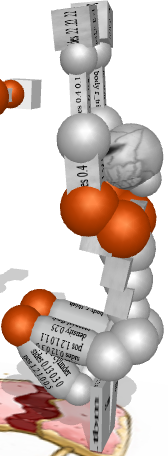
EDIT3: some of the blinking/glowing joint selection things in the tutorials are off.
EDIT4: some of the "Challenge Uke" fights can be won by doing nothing. (relaxing all and hitting space)
EDIT1: Pressing "L" to ungrab/grab is not disabled in the tutorials.
Also I think the mouse wheel and pressing "L" should be covered in the tutorial basics.
EDIT2: joint colors are wrong after moving them in tutorials if you have custom joints.
What i mean:
EDIT3: some of the blinking/glowing joint selection things in the tutorials are off.
EDIT4: some of the "Challenge Uke" fights can be won by doing nothing. (relaxing all and hitting space)
Last edited by MrPoptart; Jan 12, 2010 at 10:25 AM.