





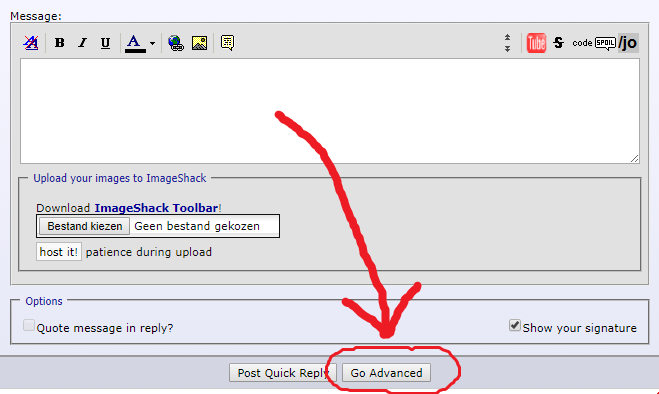
First click on Go Advanced, located here:
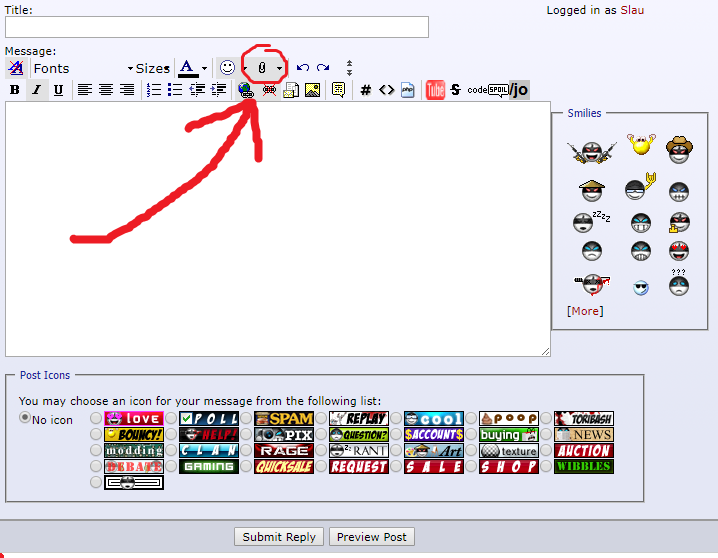
Then, click on the small paperclip icon located here:
You'll get a pop-up where you can choose to upload files. Find your Toribash folder, open the map named 'replay', get the replays you want to upload and you're done!
Extra tip: editing posts by clicking the edit button in the bottom right of one of your older posts will also give you the option to go advanced. This way, you can add replays to older posts.
Then, click on the small paperclip icon located here:
You'll get a pop-up where you can choose to upload files. Find your Toribash folder, open the map named 'replay', get the replays you want to upload and you're done!
Extra tip: editing posts by clicking the edit button in the bottom right of one of your older posts will also give you the option to go advanced. This way, you can add replays to older posts.
Last edited by Slau; Jul 5, 2017 at 09:44 PM.